What Are AI Agents and Why Every Business Will Use One
AI agents don't just answer questions, they take action. Here's what they are, how they work, and why they matter for your business.

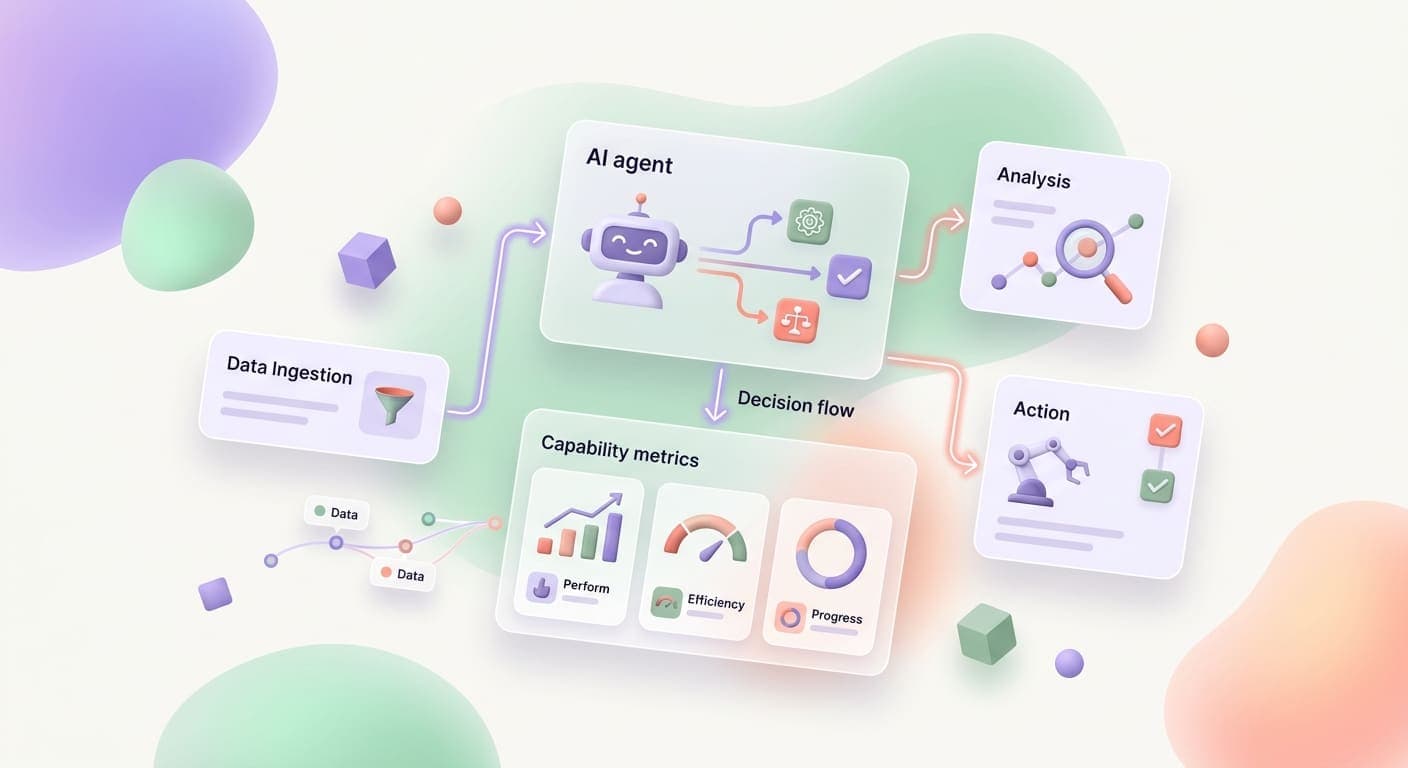
Chatbots Answer Questions. AI Agents Do the Work.
You have probably talked to a chatbot before. You typed a question, got a canned response, and moved on. Maybe it helped. Probably it didn't. Chatbots are retrieval machines. They pull answers from a knowledge base and hand them back. Nothing more.
AI agents are a different animal entirely.
An AI agent doesn't wait for you to ask it something. It takes a goal, breaks it into steps, uses tools to get things done, and adjusts when something goes wrong along the way. Think of the difference between a search engine and a personal assistant. One gives you links. The other books your flight, checks your calendar for conflicts, and texts your spouse the confirmation.
That distinction, answering versus doing, is the single biggest shift happening in business technology right now. And it's worth understanding clearly, because agents are about to show up in every industry whether you're ready for them or not.
Where copilots fit in
You might have heard the term "copilot" from Microsoft or GitHub. Copilots sit between chatbots and agents. They suggest actions, draft content, and surface relevant data, but a human still clicks the button. A copilot recommends the email reply. An agent sends it, logs it in your CRM, and sets a follow-up task for next Tuesday.
Agents close the loop. That's what makes them powerful.
How AI Agents Actually Work
Every AI agent, from a simple scheduling bot to a complex research system, runs on the same core loop: perceive, reason, act.
Perception
The agent takes in information. That might mean reading an incoming email, scanning a database, watching a webhook fire, or pulling data from an API. It gathers context about what's happening and what it needs to know.
Reasoning
This is where the language model kicks in. The agent evaluates what it perceived, decides what to do next, and plans a sequence of steps. If a customer emails asking to reschedule an appointment, the agent doesn't just detect the intent, it checks the calendar, finds open slots, considers the customer's timezone, and drafts a response with options.
Action
The agent uses tools. Real tools. It calls APIs, updates spreadsheets, sends messages, creates records, triggers workflows. After each action, it loops back to perception: did the action succeed? Has the situation changed? Does the plan need adjusting?
What holds it all together
Three things make this loop actually work in practice:
- Memory. Agents remember context from previous interactions. A support agent that helped a customer last week can pick up where it left off without the customer repeating everything.
- Tool access. An agent without tools is just a language model thinking out loud. The tools, email clients, databases, CRMs, calendars, file systems, are what let it take real action in the real world.
- Planning. Good agents don't just react. They decompose complex tasks into subtasks, prioritize them, and execute them in order. When step three fails, they revise the plan instead of crashing.
Types of AI Agents Businesses Use Today
Not every agent is the same. The way they're built and deployed depends on what problem they solve.
Customer-facing agents
These handle interactions directly with your customers. Think of a support agent that resolves common tickets without escalating, a sales agent that qualifies leads and books discovery calls, or a concierge agent on an e-commerce site that helps shoppers find what they need and complete checkout.
The key requirement here is tone. These agents need to sound like your brand, handle edge cases gracefully, and know when to bring in a human.
Internal workflow agents
These run behind the scenes. They process invoices, reconcile data between systems, manage employee onboarding checklists, or compile weekly reports from multiple data sources. Nobody talks to them directly. They just get work done.
Internal agents often deliver the fastest ROI because they eliminate hours of repetitive labor that your team is already doing manually.
Data and research agents
These agents gather, synthesize, and summarize information. A market research agent might monitor competitor pricing across dozens of websites. A compliance agent might scan regulatory updates and flag relevant changes. A content agent might pull data from multiple sources and draft a report.
They turn information overload into something you can actually act on.
Multi-agent systems
This is where things get interesting. Instead of one agent doing everything, you build a team of specialized agents that work together. One agent qualifies the lead, passes it to a second agent that drafts a proposal, which hands off to a third agent that schedules the follow-up call.
Each agent is good at one thing. Together, they handle a complete workflow that used to require three or four people coordinating across Slack, email, and spreadsheets.
Real Examples of AI Agents in Action
Abstract explanations only go so far. Here's what agents are doing in real businesses today.
Lead qualification that books calls. A roofing company gets 200 form submissions a month. An agent reads each one, scores the lead based on location, project type, and budget range, sends a personalized follow-up text, and books qualified leads directly onto the sales team's calendar. Time saved: roughly 15 hours per week.
Support tickets resolved without escalation. A SaaS company's AI agent handles tier-one support. It reads the ticket, checks the customer's account status, pulls up relevant help articles, and either resolves the issue or gathers enough context to hand it to a human with a clear summary. First-response time dropped from four hours to under two minutes.
Research reports compiled overnight. A consulting firm uses a research agent that takes a brief, "analyze market entry opportunities for organic pet food in the Southeast", pulls data from public sources, structures findings by market size, competition, and distribution channels, and delivers a draft report by morning. Work that took an analyst two days now takes a few hours of agent runtime.
These aren't hypotheticals. They're running right now.
AI Agents vs. Traditional Automation
If you've already built automations with tools like Zapier, Make, or Power Automate, you might wonder where agents fit. The answer is straightforward: they solve different problems.
Use rules-based automation when:
- The process is predictable and repeatable
- Inputs are structured (form fields, database records, standardized files)
- The logic is simple: if X, then Y
- You rarely encounter exceptions
Use an AI agent when:
- Inputs are messy or unstructured (emails, documents, free-text messages)
- Decisions require judgment, not just rules
- The process has too many branching paths to map manually
- Exceptions are common and you need something that adapts
The best setups often combine both. A Zapier flow triggers the initial workflow, but an AI agent handles the step that requires interpretation, reading an email, classifying a ticket, deciding on next steps. Rules handle the predictable parts. Agents handle the parts that used to need a person.
For a deeper look at how agents and automation work together in practice, check out our practical guide to AI agents in workflow automation.
What It Takes to Build One
Building an AI agent isn't magic, but it's not trivial either. Here's what goes into it.
Model selection
The foundation is a large language model. GPT-4, Claude, Gemini, or an open-source alternative like Llama. Your choice depends on the task complexity, cost tolerance, speed requirements, and whether you need the model to run locally or in the cloud. For most business use cases, a hosted model through an API works well.
Tool integration
The agent needs access to your systems. That means API connections to your CRM, email provider, calendar, database, file storage, and whatever else it needs to take action. This is where most of the development time goes, not in the AI itself, but in connecting it to the tools that let it do real work.
Guardrails
An agent that can take action also needs boundaries. What is it allowed to do? What requires human approval? How much money can it spend? What happens when it encounters something outside its scope? Guardrails prevent expensive mistakes and keep the agent operating within safe limits.
The human-in-the-loop question
Not every action should be fully autonomous. Many businesses start with a "human approves" step for high-stakes decisions, refunds over a certain amount, outbound emails to enterprise prospects, changes to production systems. Over time, as trust builds, you expand the agent's autonomy. Starting cautious is smart.
Testing
Agents need testing just like any other software. You feed them realistic scenarios, review their decisions, check their tool calls, and refine their instructions until they handle edge cases well. This iterative process is what separates a demo from a production system.
If you're exploring what it takes to build an agent for your specific business, our custom software and AI automation teams work through this process start to finish.
Where Agents Are Headed in 2026 and Beyond
The agent landscape is moving fast. Here's what to watch.
Multi-agent orchestration. Instead of building one monolithic agent, companies are deploying teams of specialized agents that coordinate through shared protocols. One agent handles intake, another handles processing, another handles communication. They pass context to each other and handle failures gracefully.
MCP and open protocols. The Model Context Protocol (MCP) and similar standards are making it easier for agents to connect with tools without custom integrations for every single API. This is the plumbing that will let agents plug into your software stack the way browser extensions plug into Chrome. You can explore what that looks like on our models page.
Agent marketplaces. Just as you can install a Shopify app or a Slack bot today, you'll soon be able to install pre-built agents for common business tasks. Need an AP processing agent? Download it, connect your accounting software, and run it.
Agents that build agents. Meta-agents, agents that design, test, and deploy other agents, are already in early production use. A non-technical business owner describes what they need in plain language, and a builder agent creates the workflow, connects the tools, and launches the agent. We're not fully there yet, but the trajectory is clear.
For business owners watching AI chatbot trends, the shift from reactive chatbots to proactive agents represents the next major wave.
Should Your Business Build an AI Agent?
Here's a quick decision framework.
An agent makes sense if:
- You have a repeatable process that eats up significant staff time
- That process involves reading, interpreting, or responding to unstructured information
- You're already using software tools that have APIs (most modern tools do)
- The cost of errors is manageable (or you can add human approval steps)
- You want to scale output without scaling headcount at the same rate
Hold off if:
- The process is simple enough for a basic automation (don't over-engineer it)
- You haven't mapped the process clearly yet (agents need clear goals)
- Your data is scattered and undocumented (clean up the foundation first)
Most businesses land somewhere in between. You probably have two or three processes that are perfect candidates right now, and others that need some groundwork before an agent can tackle them.
The companies that figure this out early won't just save time. They'll build a compounding advantage, because every hour an agent frees up is an hour your team spends on strategy, relationships, and growth.
Ready to explore what an AI agent could do for your business? Talk to our team, we'll help you identify the right starting point and build something that actually works.
Related articles

AI Warranty and Work Order Tracking for Service Businesses: Stop Losing Money on Claims You Already Earned
Service businesses lose 15-30% of valid warranty claims to paperwork lag and missed follow-up. AI warranty tracking turns every completed job into revenue you actually collect.
Read the article: AI Warranty and Work Order Tracking for Service Businesses: Stop Losing Money on Claims You Already Earned
Claude Mythos 5 and Fable 5: What Businesses Should Know
Claude Fable 5 is a guarded Mythos-Class model available on paid plans through June 22. Here's what businesses should know.
Read the article: Claude Mythos 5 and Fable 5: What Businesses Should Know
The New AI Job Is Not Prompt Engineer. It Is Workflow Builder.
Large companies are hiring AI workflow builders because tools alone do not change how teams work. Here is what that means for your business.
Read the article: The New AI Job Is Not Prompt Engineer. It Is Workflow Builder.
