The CRM That Nobody Uses
You signed up for a CRM because you wanted organized leads, automated follow-ups, and a clear pipeline. Six months later, you have 400 contacts with no notes, 30 duplicate entries for the same person, and a monthly bill for software your team barely opens.
This is not a tool problem. It is a setup problem.
Most service businesses install a CRM, import their contacts, and expect it to work. It does not work that way. A CRM without structure, rules, and automation is just an expensive spreadsheet with worse search.
Here is how to turn yours into an actual revenue engine.
Quick answer: A CRM fails for service businesses when it has no intake rules, no dedup process, no stage definitions, and no automation. Fix those four things and your CRM goes from data graveyard to lead-driving machine in about two weeks.
Why CRMs Become Graveyards
Three patterns kill CRM adoption in service businesses:
| Problem | What It Looks Like | What It Costs You |
|---|---|---|
| No intake standard | Every lead enters differently. Some from web forms, some from text, some from a napkin. | You cannot report on anything. Leads fall through cracks. |
| No stage definitions | "Qualified," "Hot," "Follow up" mean different things to different people. | Nobody knows what to do next. Deals stall. |
| No automation | Every follow-up is manual. Every reminder is a sticky note. | Response time is measured in days, not minutes. |
We have seen this pattern at AnovaGrowth with every service business we work with. HVAC companies, law firms, home service contractors, marketing agencies. The tool is rarely the problem. The lack of operational design is.
Step 1: Clean What You Have
Before you add anything new, fix what is already broken.
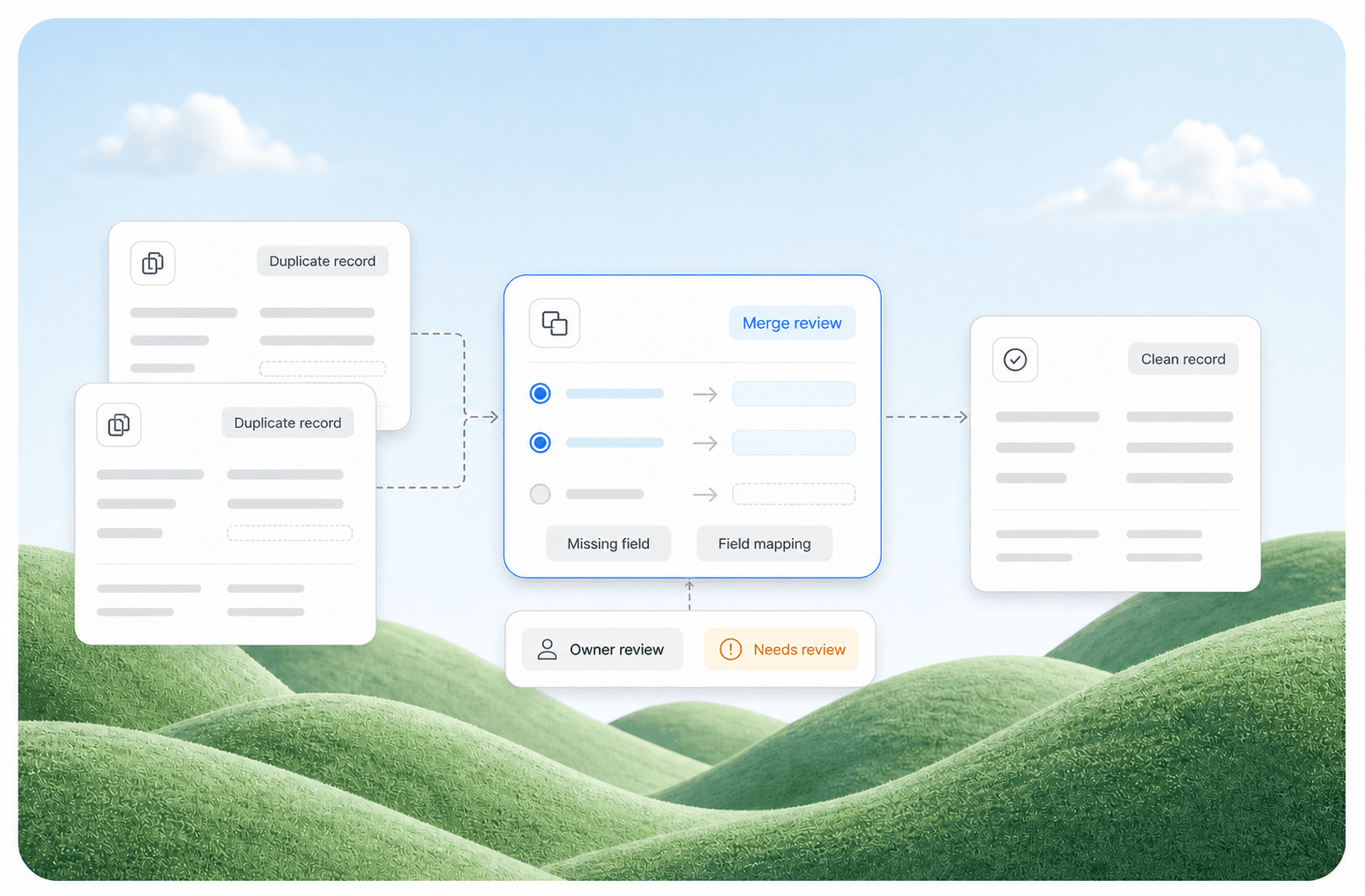
Deduplicate. Run a merge on contacts with the same email or phone number. Most CRMs have a built-in dedup tool. If yours does not, export to CSV, remove duplicates in a spreadsheet, and reimport. Do this monthly going forward.
Standardize fields. Pick 5-7 fields that matter and delete the rest. For a service business, that is usually: Name, Phone, Email, Service Needed, Lead Source, Status, and Notes. Everything else is noise.
Tag, don't folder. Folders hide data. Tags make it searchable. Tag leads by source (Google Ads, Referral, Website), by service type (HVAC, Plumbing, Legal), and by urgency (Hot, Warm, Cold).
Archive the dead. Any contact with no activity in 12 months goes to an archive folder. Do not delete it. Just move it out of your active view.
Step 2: Define Your Pipeline Stages
A pipeline with 12 stages is not a pipeline. It is a maze. Service businesses need exactly 4-5 stages:
- New Lead -- Just came in. No contact made yet.
- Contacted -- You reached out. Waiting for reply.
- Qualified -- They need your service, have budget, and are ready to decide.
- Proposal Sent -- Quote or estimate delivered.
- Closed Won / Lost -- Done.
That is it. Every lead lives in exactly one of these stages. If your team cannot agree on what "Qualified" means, write a one-sentence definition and pin it to the wall.
What this looks like at AnovaGrowth: We set up a five-stage pipeline for a Rome HVAC company that had been using a 14-stage system. Nobody could remember what stage 8 meant. After the cleanup, their close rate went up 18% in 60 days because leads stopped getting stuck in undefined stages.
Step 3: Automate the First 48 Hours
The first 48 hours after a lead comes in determine whether they become a customer. Automate this window.
What to set up:
- Instant confirmation. When a lead fills out your web form, the CRM sends an automated text or email: "Thanks for reaching out. We will review your request and get back to you within [timeframe]."
- Internal notification. The CRM pings the right person (or team channel) with the lead details. No manual forwarding.
- 24-hour follow-up reminder. If nobody has changed the lead from "New" to "Contacted" within 24 hours, the CRM sends a reminder to the assigned person and a backup to the manager.
- 48-hour re-engagement. If the lead has been contacted but not responded, send a gentle follow-up automatically.
This is not complicated. Most CRMs (HubSpot, Zoho, Pipedrive, even many industry-specific tools) support these triggers natively or through a connector like Make or Zapier.
Step 4: Build the Handoff Rules
The most common CRM failure we see is the handoff gap. A lead comes in through the website. The office manager sees it. They forward it to a salesperson. The salesperson calls, misses them, and forgets to log it. The lead disappears.
Fix it with rules:
- Web form submissions go directly into the CRM as "New Lead" with the source tagged.
- The CRM auto-assigns the lead based on round-robin or territory.
- If the assigned person does not update the stage within 4 hours, the lead reassigns to a backup.
- Every call attempt gets logged automatically (use a CRM with call logging or a VoIP integration).
No manual forwarding. No sticky notes. No "I thought you handled that."
Step 5: Measure What Matters
Once your CRM is clean and automated, you can finally answer the questions that matter:
- How many leads came in this week?
- What is the most common source?
- What is your average response time?
- How many leads moved from "New" to "Contacted" within 24 hours?
- What is your stage-by-stage conversion rate?
If you cannot answer these from your CRM in under 30 seconds, your setup is not done yet.
Related reading: Custom Analytics Dashboards for Service Businesses -- when your CRM's built-in reports are not enough.
Common Questions About CRM Operations
How often should I clean my CRM? Monthly for dedup and archiving. Quarterly for a full field audit.
What CRM is best for a small service business? The one your team will actually use. Pipedrive and HubSpot are good starting points. The tool matters less than the process.
Can I automate CRM cleanup? Partially. Dedup and archiving can be scheduled. Field standardization needs a human eye.
Should I hire someone to set this up? If you have more than 500 contacts and no internal process, yes. A one-time setup saves months of frustration.
What if my team resists using the CRM? Usually because it is too complicated or they do not see the value. Simplify the fields, automate the data entry, and show them the reports. Resistance drops when the tool saves them time instead of creating work.
How do I connect my CRM to my website? Most CRMs have a web form builder or a JavaScript snippet. If yours does not, use a middleware tool like Make or Zapier.
What This Looks Like When It Works
A clean, automated CRM does not feel like software. It feels like a well-run front desk.
Leads come in and get logged instantly. Follow-ups happen on schedule. Nobody asks "Did we call that person back?" because the system tells you. Reports take 10 seconds to pull instead of an hour of spreadsheet wrangling.
The difference between a CRM that works and one that does not is not the price tag. It is the 10 hours you spend upfront getting the structure right.
Need to clean up your CRM? Contact us to discuss a CRM audit and automation setup for your service business. We handle the structure so you can focus on the work that pays.
Related: How to Build a Lead Generation Engine That Runs Itself | Workflow Automation for Service Businesses