Multi-Channel Communication for Service Businesses: Manage Phone, Text, Email, and Chat Without Dropping the Ball
Service businesses juggle phone calls, texts, emails, and web chat every day. Here is how to unify them into one system that never drops a lead.

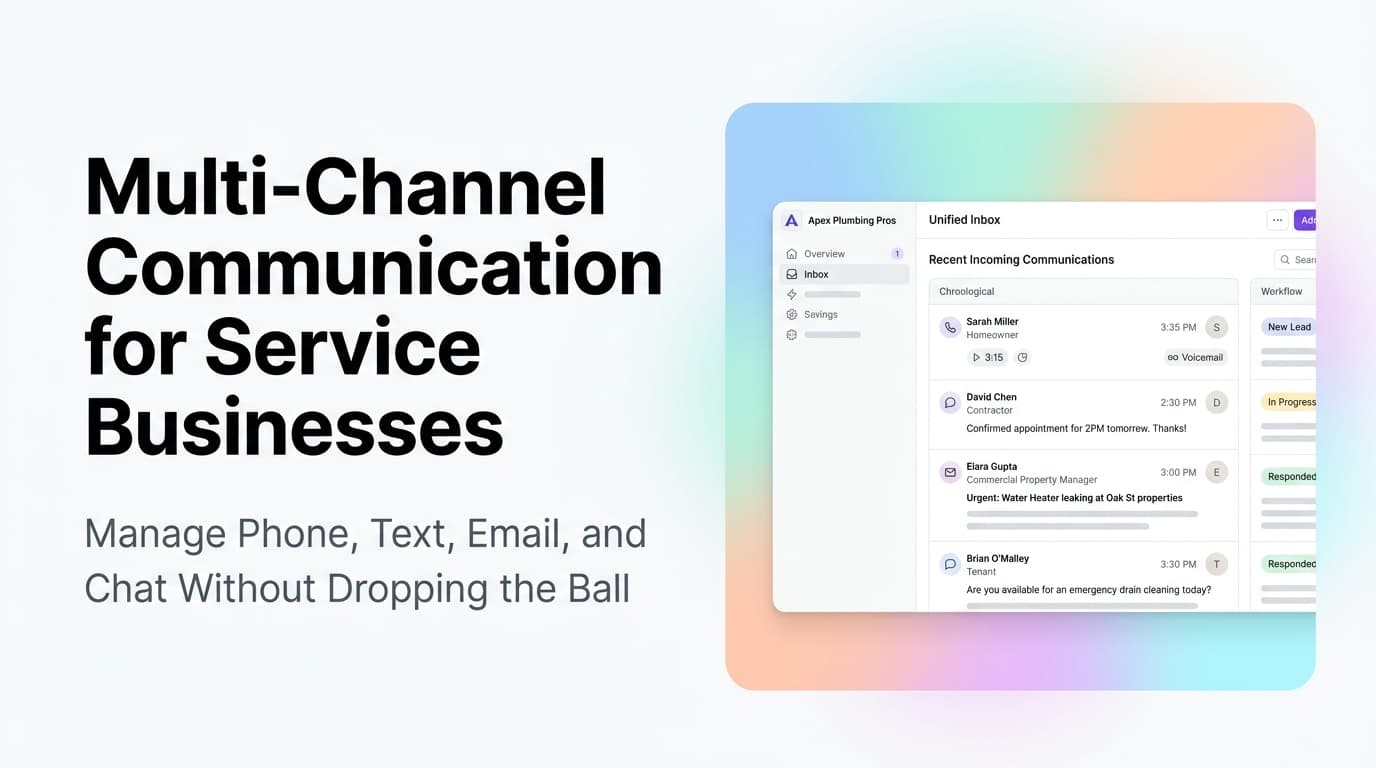
Your Customers Will Call, Text, Email, and Chat. Can You Handle All Four Without Losing Track?
A customer finds your Google Business Profile at 9 PM. They send a text through the GBP messaging feature. At 9:05, they fill out your contact form. At 9:10, they call and leave a voicemail. The next morning, three different people on your team respond to three different channels, and nobody knows the full story.
This is not a hypothetical. It happens every day to service businesses that have not unified their communication channels. The result is double responses, missed context, and customers who feel like they are starting over every time they reach out.
Quick answer: Multi-channel communication for service businesses means routing every inbound message from phone, text, email, web chat, and social media into a single shared inbox inside your CRM. When done right, it cuts response time from hours to minutes, eliminates duplicate work, and gives every team member the full conversation history regardless of which channel the customer used.
The Cost of Fragmented Communication
When your communication channels are not connected, the leaks add up fast.
| Channel | Common Problem | Estimated Impact |
|---|---|---|
| Phone | Voicemails checked once a day | 30-50% of callers never hear back |
| Text/GBP Messaging | Messages seen by one person only | 40-60% of texts go unanswered |
| Buried in inbox, no routing | 20-30% of inquiries get lost | |
| Web Chat | Only answered during business hours | 50%+ of chats happen after hours |
| Social Media DMs | Checked weekly or not at all | Nearly 100% of DMs are missed |
A service business with 100 inbound inquiries per month across these channels is probably losing 30-50 of them to the gaps between channels. That is not a marketing problem. It is a communication infrastructure problem.
What Unified Communication Looks Like
The goal is a single inbox where every message lands, regardless of source. Here is how it works in practice:
- A customer calls your main number. The call is answered or sent to voicemail. The voicemail transcript and recording appear in your CRM as a new lead activity.
- A customer texts your business number or sends a GBP message. The text appears in the same inbox as the voicemail, with the customer's contact record attached.
- A customer fills out your website contact form. The form submission creates a new lead in the CRM and triggers an automated reply within seconds.
- A customer sends an email to your info@ address. The email is logged to the same contact record, visible to anyone on your team.
Every interaction is timestamped, attached to the right contact, and visible to everyone who needs it. No more "did anyone call back about the Smith job?"
The Three Pieces of the Puzzle
1. A CRM That Acts as the Hub
Your CRM is the central record for every customer interaction. If your CRM only stores contact names and phone numbers, it is not doing its job. The CRM needs to log calls, texts, emails, and chat transcripts automatically.
What to look for: A CRM with built-in communication logging or one that integrates with a telephony platform, SMS gateway, and email sync. Most modern CRMs offer this, but many service businesses never turn on the features.
2. A Telephony Platform That Integrates With Your CRM
Your phone system needs to do more than ring. It needs to log calls, record voicemails, and create contact records automatically. Platforms like RingCentral, Dialpad, and Twilio-based systems can do this when connected to your CRM.
What to automate:
- Inbound calls create or match a contact record
- Voicemail transcripts are saved to the contact timeline
- Missed calls trigger an automated text or email follow-up
- Call recordings are attached to the job or lead
3. Automated Routing and Response
Once messages land in the same inbox, you need rules that route them to the right person and trigger the right response.
What to automate:
- New leads from any channel get an instant acknowledgment (text or email)
- Messages about existing jobs route to the assigned technician or project manager
- After-hours messages trigger an automated response with booking options
- Urgent keywords (leak, emergency, broken) trigger a priority alert to the on-call person
AnovaGrowth Insight: The 80/20 Rule of Communication Setup
We have helped service businesses set up unified communication systems across HVAC, plumbing, electrical, and home services. The pattern is always the same: 80% of the value comes from getting the first three channels right (phone, text, email) and connecting them to the CRM. Web chat and social DMs are nice additions, but they rarely produce more than 10-15% of total leads.
Where we see the biggest wins:
- Phone + CRM integration cuts lead response time from hours to minutes. One HVAC client went from a 4-hour average callback time to under 5 minutes by connecting their phone system to their CRM and setting up automated missed-call follow-up.
- Text message routing captures the 40% of customers who prefer texting over calling. A plumbing company added GBP messaging to their CRM inbox and picked up 12 extra booked jobs in the first month.
- Email-to-CRM logging eliminates the "I sent you an email" game. When every email is visible in the CRM, nobody has to ask "can you forward that to me?"
How to Set This Up Without a Full-Time IT Person
You do not need a custom-built system. Most of the pieces are available as off-the-shelf integrations.
Step 1: Pick your CRM as the hub. If you already use a CRM, start there. If you do not have one, choose a platform that offers built-in communication features or connects easily to telephony and email tools.
Step 2: Connect your phone system. Most business phone systems offer CRM integration. If yours does not, consider switching to a platform that does. The ROI on this single change often pays for the phone system upgrade within 30 days.
Step 3: Set up SMS and email logging. Enable the integration between your CRM and your email provider. Set up a business SMS number through your CRM or a connected SMS platform.
Step 4: Create routing rules. Decide who gets which types of messages. New leads go to sales. Existing customer messages go to the assigned contact. Emergency keywords trigger alerts.
Step 5: Test with real traffic. Run the system for a week and check for gaps. Are all channels landing in the inbox? Are responses going out fast enough? Are messages routing to the right people?
Related Questions Service Business Owners Ask
- How do I handle after-hours calls without paying for a live answering service?
- What is the best CRM for a small service business with 5-20 employees?
- Should I use a separate business number for texting, or can I use my existing line?
- How do I train my team to use a shared inbox without stepping on each other's replies?
- Can I automate responses to common questions like "what are your hours" and "how much do you charge?"
- What happens when a customer switches from text to phone mid-conversation?
What This Means for Your Business
Unified communication is not a luxury. It is the foundation that every other automation sits on. If your phone, text, email, and chat are not connected to the same system, you are leaking leads every day. Fixing this one thing will produce more immediate revenue impact than almost any other automation you can add.
The good news is that the tools exist and the setup is straightforward. You do not need a custom build or a dedicated IT person. You need a CRM that can act as a hub, a phone system that talks to it, and a few hours to configure the routing.
Ready to stop losing leads between channels? Contact us to discuss how we can connect your phone, text, email, and chat into one system. Or read about CRM integration for service businesses to see how the pieces fit together. For a broader look at the tools you need, check out our guide to all-in-one vs best-of-breed tech stacks.
Related articles

AI Automation for Landscaping and Lawn Care Businesses: Win More Bids, Route Crews Faster, and Stop Losing Maintenance Contracts
Landscaping companies lose 30-50% of bids to slow follow-up and 20-40% of maintenance contracts to silent churn. AI automation fixes both.
Read the article: AI Automation for Landscaping and Lawn Care Businesses: Win More Bids, Route Crews Faster, and Stop Losing Maintenance Contracts
Customer Journey Automation for Service Businesses: Map the Path, Automate the Steps
Service businesses lose customers at every stage of the journey. Map the path from first search to repeat booking, then automate the handoffs.
Read the article: Customer Journey Automation for Service Businesses: Map the Path, Automate the Steps
Automated Lead Routing and Assignment for Service Businesses: Get the Right Lead to the Right Person Instantly
Service businesses lose 30-50% of leads to poor routing. Automated lead assignment gets the right lead to the right person instantly.
Read the article: Automated Lead Routing and Assignment for Service Businesses: Get the Right Lead to the Right Person Instantly
