Quick Answer
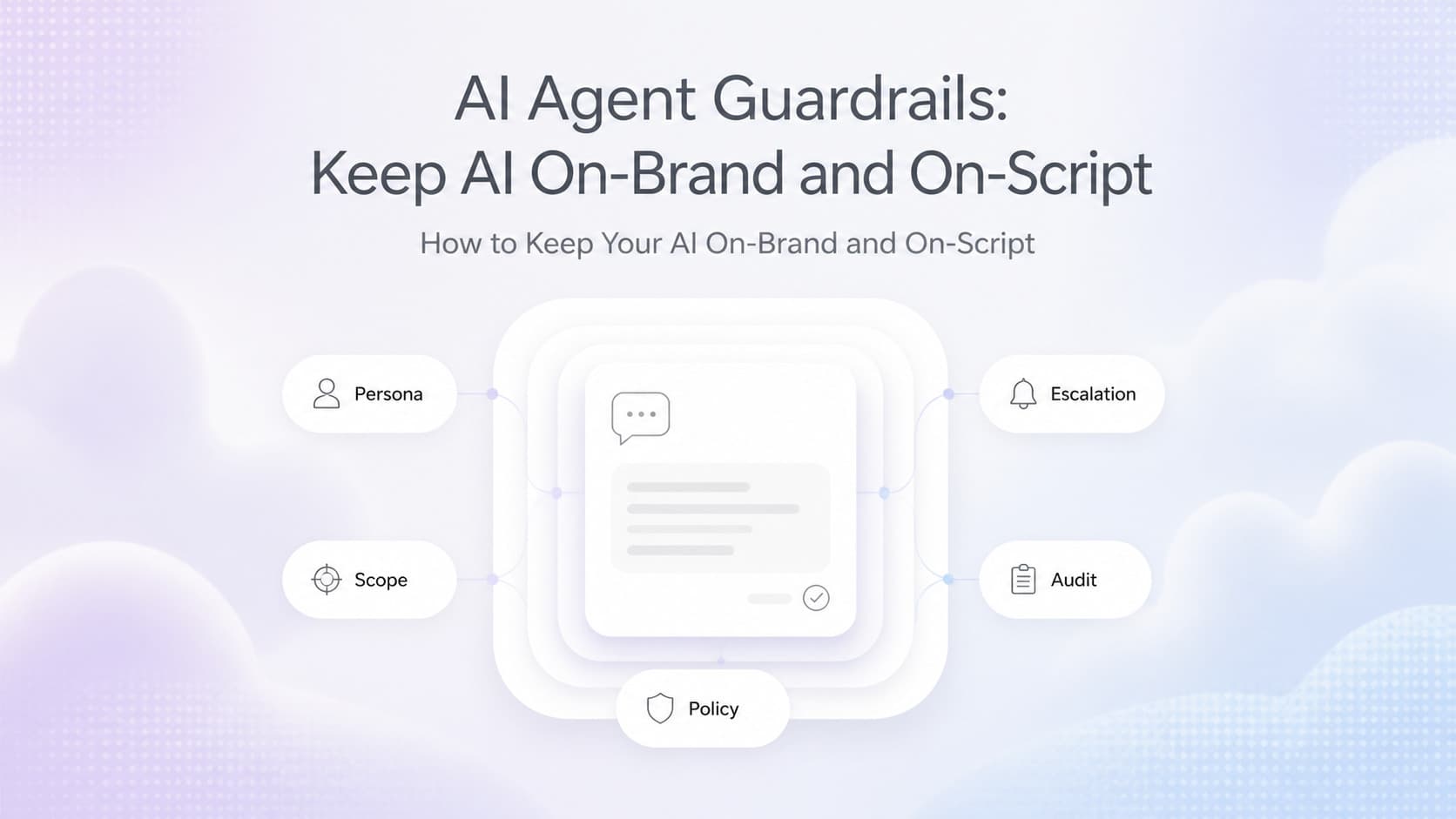
AI agent guardrails are the rules, prompts, and review systems that keep your AI from saying the wrong thing to customers. AI agents drift because they are probabilistic, read every customer input as a fresh prompt, and change silently when the provider ships a new model. A working guardrail stack has five layers: persona and tone, scope of authority, policy rules, escalation, and an audit log. Ship those five and you stop most bad replies before they reach a customer.
Why AI Agents Drift Off-Script
Owners who deploy AI agents usually expect the agent to behave like a trained employee. They write a prompt, paste it into the system, ship it, and walk away. Two weeks later the agent is offering a 30 percent discount that does not exist, telling a customer the business is open on Sundays when it is closed, or arguing with a customer about a return policy the agent invented.
The pattern is consistent. The agent is not broken. The prompt is not bad. The model is doing what models do, which is generate the most likely next token based on the conversation so far. When the conversation drifts into territory the prompt did not cover, the model fills in with plausible-sounding text. Some of that text is wrong. Some of it is harmless. Some of it costs money.
Three forces drive the drift:
- Probabilistic output. A model is a sampler. Ask the same question twice and you can get two different answers. Most of the time the answers are close. Sometimes they are not.
- Customer prompts as attack surface. Customers type typos, slang, frustration, sarcasm, and the occasional prompt injection attempt. A model that handles the polite version of a question confidently may handle the hostile version badly.
- Silent model updates. Providers ship new versions weekly. A model that was safe in July can drift in August with no change to your code, your prompt, or your workflow.
The fix is not a better prompt. The fix is a layered guardrail system that catches what the prompt alone cannot.
The Six Failure Modes That Hurt Customers
Before you build guardrails, you need a taxonomy of the failures you are actually trying to prevent. Almost every bad AI reply we see at client sites falls into one of six buckets.
| Failure Mode | What It Looks Like | Business Impact |
|---|---|---|
| Pricing hallucination | Agent quotes a price that does not exist or is wrong | Customers expect a discount, sales writes it off, margin erodes |
| Policy invention | Agent invents a return window, warranty length, or service area | Customer shows up expecting a service you do not offer |
| Scope creep | Agent starts answering questions in areas it is not trained on | Liability, bad advice, lost trust |
| Tone mismatch | Agent is rude, flippant, or overly chatty when the customer is upset | Customer leaves, posts a bad review, escalates publicly |
| PII and secrets leak | Agent repeats internal notes, account numbers, or another customer's data | Compliance breach, privacy lawsuit, lost trust |
| Loop or stall | Agent repeats itself, asks the same clarifying question, or never resolves | Customer abandons the conversation, calls anyway, time wasted |
Only one of these six is a "model went wrong" failure. The other five are guardrail failures. The customer experience problem is the same regardless of the cause, and the fix is the same: a guardrail layer that catches the bad reply before it ships.
The Five Layers of a Working Guardrail Stack
A serious AI guardrail stack has five layers. Each layer catches a different class of failure. Skipping a layer leaves a gap that becomes a customer incident in production.
| Layer | What It Constrains | How It Works | Typical Tooling |
|---|---|---|---|
| Persona and tone | Voice, register, formality, brand words and banned words | System prompt, style examples, banned phrase list | Prompt template, brand voice guide |
| Scope of authority | Topics the agent can answer, topics it must decline | Topic routing, refusal policies, allowed domains | Vector store, classifier, keyword filters |
| Policy | Pricing, legal promises, compliance, regulated content | Hard rules, lookup tables, red-line checks | External data fetch, rule engine, regex |
| Escalation | When to hand off to a human, with full context | Confidence thresholds, sentiment triggers, keyword flags | Live chat handoff, ticket creation, scheduler |
| Audit | Every reply logged with prompt, response, layer outcomes, reviewer | Structured logs, weekly sample review, escalation metrics | Log table, dashboard, weekly review ritual |
Why All Five
Persona and tone keep the agent from sounding like a different company. Scope keeps it from answering questions outside its lane. Policy keeps it from making promises the business cannot honor. Escalation keeps it from drowning when it is out of its depth. Audit is what lets you catch the failures the other four missed and improve the system over time.
If you only have one layer, pick audit. You cannot improve what you cannot see. Without logs, every other layer is a guess.
If you have two, add persona and tone. The fastest way to lose trust is to have the agent sound like a bot, or worse, sound like a different company.
If you have three, add scope. The fastest way to get sued is to have the agent write legal advice, medical advice, or pricing decisions outside the policy.
The fourth and fifth layers are where mature AI deployments live. They are also where most teams stop investing because they feel like overhead. They are not. They are the difference between a chatbot and a customer-facing AI product a business can stake its reputation on.
Building Your Guardrail Stack in One Week
You do not need a six-month project. A working guardrail stack for a single AI agent can ship in a week. Here is the sequence we use for new deployments.
Day 1: Write the Persona and Tone Doc
A one-page persona document with voice, formality, banned phrases, and three example replies. The doc does not need to be long. It needs to be specific. "Be friendly" is useless. "Never use the word 'unfortunately.' Never say 'I can't help with that.' Always say 'Let me get you to the right person' before escalating" is useful.
The persona doc becomes the source of truth for the system prompt, the escalation script, and the human review checklist. Put it in the same repo as the agent code so it lives or dies with the project.
Day 2: Define the Scope of Authority
List the topics the agent is allowed to answer, the topics it must decline, and the topics it must escalate. For a service business chatbot, allowed is "pricing tiers, service area, hours, booking." Declined is "medical, legal, tax, regulatory questions about permits." Escalated is "complaints, refund requests, anything about a specific named employee."
Build a simple classifier or keyword router that checks the customer's first message against this list. If the message is in scope, the agent answers. If it is declined, the agent plays a refusal script. If it is escalated, the agent hands off.
Day 3: Encode the Policy Rules
Pull the rules that must not be violated out of the agent's reasoning and into a lookup or rule engine. Pricing, service hours, warranty terms, compliance disclosures, and any regulated phrasing should not live in the prompt. They should live in a database the agent reads from.
The reason is simple. Prompts get rewritten. Models drift. Policies do not. When the policy is data, you can update it without retraining, redeploying, or hoping the model picks up the change.
Day 4: Wire Up the Escalation Path
Decide the trigger for escalation before you ship. Three triggers cover most cases:
- Confidence threshold. If the agent's confidence in its answer drops below 70 percent, escalate.
- Sentiment trigger. If the customer's sentiment goes negative, escalate immediately.
- Keyword trigger. If the message contains "refund," "cancel," "manager," "lawyer," or any other escalation word, escalate immediately.
Hand the customer off to a human with the full conversation transcript, the customer's name, and the reason for escalation. The worst AI experience is a loop that ends with "I have forwarded your request" and no follow-up.
Day 5: Ship the Audit Log
Every AI reply should write a row to a log table with the prompt, the response, the layer outcomes (did it pass persona, scope, policy, escalation), and the customer ID. The log is the foundation of every improvement you make from this point forward.
Add a weekly review ritual: pick 20 random replies, read them as a human, score them on tone, accuracy, and policy, and add the patterns you find to the guardrail stack. Twenty replies a week, reviewed by a human, catches more quality issues than any automated metric.
AnovaGrowth Operating Insight
When we deploy an AI agent for a client, we ship the persona doc, the scope list, and the policy rules on day one. We do not wait for the agent to "stabilize." The fastest way to learn what a guardrail stack needs is to watch it fail in production.
The pattern we see most often is teams who treat the prompt as the only guardrail. The prompt is the starting point. The prompt is not the system. A prompt is a paragraph. A guardrail stack is a product.
Three things we have learned the hard way:
- Banned phrases beat positive instructions. Telling a model "do not say unfortunately" is more reliable than telling it "be optimistic." Negative constraints are easier for the model to enforce than positive ones.
- The audit log is the product. Every improvement we have made to a client AI agent in the last two years came from reading the audit log, not from rewriting the prompt. The log is where the real conversation between the agent and your customers lives.
- Escalation is the most underrated feature. Most teams over-invest in the agent's answers and under-invest in the handoff. A great handoff with full context beats a mediocre answer that never escalates. Customers do not expect AI to be perfect. They expect AI to get them to a human when it is not.
The combination of a written persona, a clear scope, a policy data layer, a confident escalation path, and a weekly audit is what keeps our clients' AI agents on-brand for months instead of drifting into bad replies that cost trust and revenue.
Common Fan-Out Questions
Once teams start building guardrails, the questions usually go in this order:
- What is the difference between a guardrail and a prompt? A prompt is a paragraph of instructions. A guardrail is a system that enforces rules. Prompts get ignored, especially under long contexts. Guardrails are enforced by code, by classifiers, or by external lookups. Always build the high-stakes rules as guardrails, not as prompts.
- How do I prevent an agent from quoting the wrong price? Pull the price from a data source at the moment of the reply. The agent should not contain the price. The agent should ask the data store for the price and use the answer. If the data store does not have the price, the agent should say so and escalate.
- How do I stop the agent from leaking another customer's information? Strip personally identifiable information from the prompt before it reaches the model. The agent should never see another customer's data. The agent should only see the current customer's data, scoped to what the agent is allowed to know.
- What is the cheapest way to add a banned phrase list? A post-processing step. Run the agent's reply through a regex list of banned phrases before it goes to the customer. If a phrase matches, replace the reply with a safe fallback and log the event. This catches 80 percent of brand voice drift in five minutes of code.
- How often should I review the audit log? At minimum, weekly. Twenty replies a week, read by a human, is enough to catch the patterns that automated metrics miss. More volume means more review, but the rule is the same: a human eyeballs a sample every week.
- Do I need a separate guardrail tool, or can I build this in code? Build it in code for the first six months. Most guardrail stacks are a few hundred lines of code plus a log table. Once you have three or more agents, graduate to a managed tool like LangSmith, Guardrails AI, or a hosted policy engine. Buying before you understand the failure modes is the most expensive mistake.
When to Skip Building This Yourself
Guardrails are not free. Decide whether to build or buy based on the size of the blast radius.
- You have one AI agent on the website. A prompt with banned phrases and a confidence-based escalation is enough. Audit the logs weekly. Add a real guardrail stack when the agent handles more than 1,000 conversations a month.
- You have a single internal AI tool. A prompt plus a human review of every output is sufficient. Most internal tools have smaller blast radius and slower failure cycles.
- You are a regulated business. Healthcare, legal, financial, insurance, anything that touches PHI, PII, or regulated advice. Skip the prompt-only phase. Build or buy a real guardrail stack before you ship the agent to a customer.
Build a custom guardrail layer if you have more than five AI agents, customer-facing AI at scale, or strict data residency requirements that block managed tools.
For most service businesses and small operations, a written persona, a clear scope list, a policy data layer, a confidence-based escalation, and a weekly audit log is enough to keep AI agents on-brand and on-script for the long haul.
Ready to ship AI agents that stay on-brand and on-script? Talk to AnovaGrowth about adding a guardrail stack to your existing AI agents, or read our AI workflow observability guide to see how guardrails fit into a complete AI operations stack. If you are still deciding which AI use cases are worth the risk, our AI cost management guide walks through the budget and ROI math first.