The Problem: You Did the Work, Now You Have to Chase the Money
You finished the job. The client was happy. Then the invoice went out and... nothing. Two weeks later you are sending a polite reminder. Three weeks after that you are on the phone. A month later you are wondering if you should fire the client or just eat the loss.
This is the hidden tax on running a service business. You do the work, you invoice, and then you spend hours chasing what you already earned. For small and midsize service businesses, this chase time adds up to 10 to 20 hours per month per owner or office manager. That is time you could spend on billable work, new clients, or anything other than reminding people to pay you.
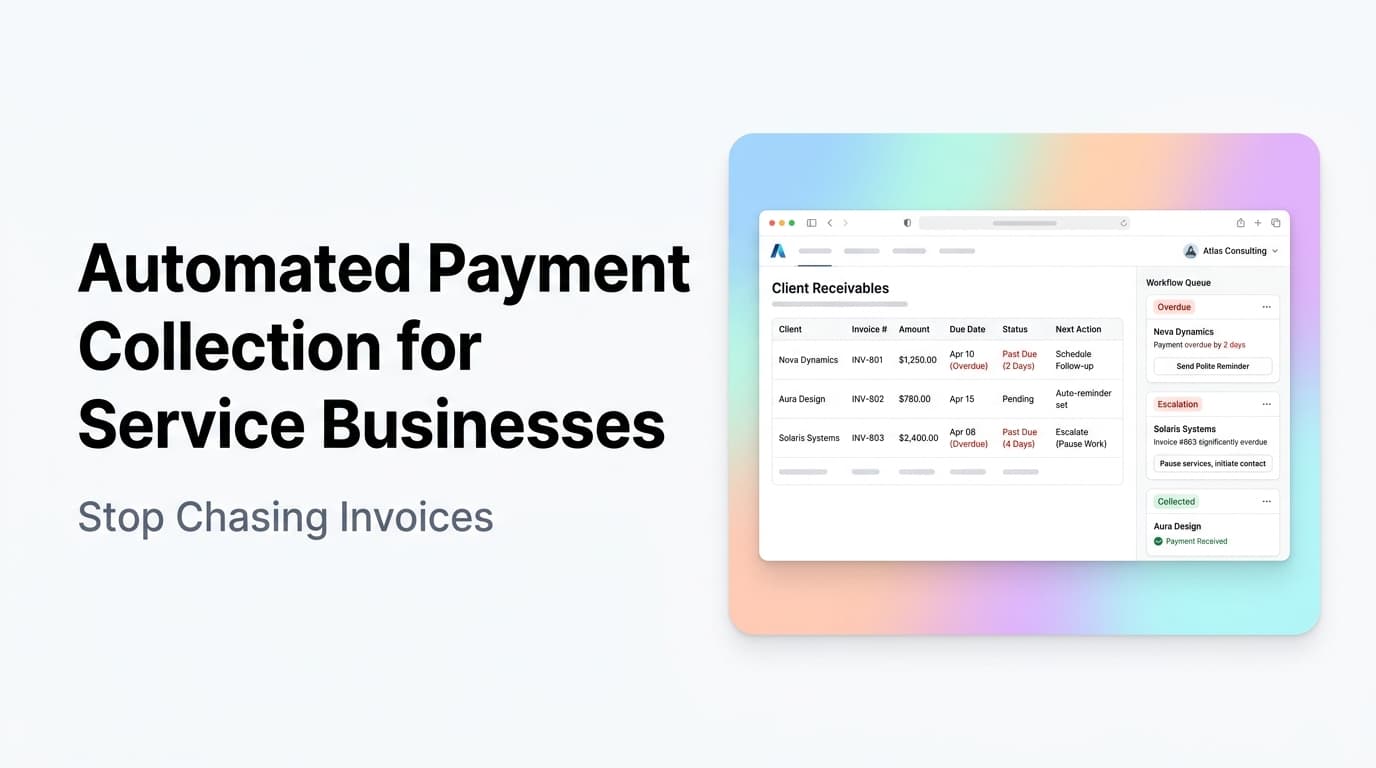
Quick answer: Automated payment collection uses software to send invoices, send payment reminders, process recurring charges, and reconcile payments without manual follow-up. It turns a reactive chase into a predictable system that gets you paid faster with less effort.
What Automated Payment Collection Actually Looks Like
Here is how it works in practice:
| Before Automation | After Automation |
|---|---|
| Create invoice manually in accounting software | Invoice auto-generates from completed job in your CRM or scheduling tool |
| Email invoice as PDF attachment | Invoice sent automatically with a pay-now link |
| Set a calendar reminder to follow up in 7 days | System sends reminder emails on days 3, 7, 14, and 21 |
| Call or email the client to ask about payment | Client gets a text message with a payment link |
| Manually mark invoice as paid in two systems | Payment auto-reconciles with your accounting and CRM |
| Run a report to see who owes you money | Live dashboard shows aging receivables and payment status |
The difference is not just convenience. It is structural. One approach depends on you remembering to do things. The other runs on a schedule whether you think about it or not.
Where Service Businesses Lose the Most Money
1. The First 48 Hours After the Job
The best time to collect payment is right after you deliver the work. The client is happy, the value is fresh, and there is no friction. If you wait until the end of the month or send an invoice a week later, you lose that momentum.
Automated collection systems can trigger an invoice the moment a job is marked complete in your scheduling or CRM system. The client gets a text or email with a payment link before you have even packed up your tools.
2. The Follow-Up Gap
Studies across service industries show that a single invoice follow-up increases payment rates by 25 to 30 percent. A second follow-up adds another 10 to 15 percent. Most service businesses send one invoice and then wait. Automated systems send a sequence of reminders at set intervals, each one slightly more direct than the last.
A typical automated sequence looks like this:
- Day 0: Invoice sent with payment link
- Day 3: Friendly reminder, "Just checking in on invoice #1234"
- Day 7: More direct reminder with late fee notice (if applicable)
- Day 14: Final notice with account hold warning
- Day 21: Escalated to collections or owner review
Each step runs automatically. You only step in when the system flags a problem.
3. Recurring Billing That Never Happens
If you offer maintenance contracts, retainer agreements, or subscription services, manual monthly billing is a leaky bucket. You forget to send the invoice. The client forgets to pay. By month three you are either chasing two months of payments or the client has lapsed entirely.
Automated recurring billing charges the client on the same day every month. No invoice to send. No check to wait for. The payment just processes. For service businesses with recurring revenue, this alone can increase monthly collection rates from 70 percent to 95 percent or higher.
What You Need to Set This Up
You do not need a full accounting department. You need three things:
-
A payment processor that can store payment methods and process recurring charges. Stripe, Square, and PayPal all do this. Most CRMs and scheduling tools already integrate with at least one of these.
-
A CRM or job management system that can trigger invoices based on job status. When a job moves from "in progress" to "complete," the system should fire an invoice. Tools like Housecall Pro, Jobber, ServiceTitan, and many CRMs support this natively.
-
An automation layer that connects your job system to your payment system and runs the reminder sequence. This is where tools like Zapier, Make, or a custom integration come in. If your CRM already has built-in payment automation, you may not need a separate tool.
AnovaGrowth operating insight: We have set up payment automation for HVAC, plumbing, landscaping, and consulting clients. The most common mistake is trying to automate payment collection before cleaning up the job-to-invoice mapping. If your system does not know which jobs are complete and billable, automation will send wrong invoices or miss jobs entirely. Fix the data flow first, then add the payment automation.
Proof: What Happens When You Automate
These are real outcomes from service businesses that implemented automated payment collection:
- An HVAC company with 4 technicians reduced average days to payment from 38 to 9. Their office manager went from 12 hours per week on invoicing and follow-up to 2 hours.
- A landscaping company with recurring weekly contracts moved from manual monthly invoicing to automated ACH billing. Their collection rate went from 72 percent to 97 percent in 90 days.
- A consulting firm with retainer clients eliminated late payments entirely by switching to automated monthly billing with a stored payment method. They have not sent a past-due notice in 18 months.
These are not outliers. They are the normal result of replacing a manual, reactive process with an automated, scheduled one.
Common Objections (And Why They Are Wrong)
"My clients prefer to pay by check."
Some do. But the number of clients who prefer checks is shrinking fast. Offer multiple payment options including card, ACH, and digital wallet. Most clients will choose the fastest option when given the choice. For the few who insist on checks, you can still automate the reminder and reconciliation parts.
"Automated billing feels pushy."
It feels pushy to you because you are the one sending the reminders. To the client, an automated payment system feels professional. It means you have your processes together. It means they do not have to remember to pay you. Most clients prefer a system that handles payments without them having to think about it.
"I do not want to pay processing fees."
Processing fees are 2 to 3 percent. The cost of chasing payments manually is much higher when you factor in your time. If your hourly rate is $100 and you spend 10 hours a month on payment follow-up, that is $1,000 in lost time. Processing fees on $50,000 in monthly revenue at 2.5 percent are $1,250. The automation pays for itself in time savings alone, and you get paid faster on top of that.
How to Get Started This Week
You do not need a six-month implementation project. Here is a practical path:
-
Pick one payment method. If you take cards, set up Stripe or Square. If you take ACH, set up a payment processor that supports bank transfers. Start with one.
-
Connect your CRM or job software to your payment processor. Most modern service business CRMs have built-in payment integrations. Turn them on. If yours does not, use Zapier or Make to connect them.
-
Set up one automated reminder sequence. Start with a three-email sequence: invoice sent, reminder at day 5, final notice at day 14. Run it for one month and see what happens.
-
Add recurring billing for any recurring clients. If you have maintenance contracts or retainers, set up automatic monthly charges. This is usually a single toggle in your payment processor.
-
Review the results after 30 days. Compare your average days to payment, your collection rate, and the time your team spends on invoicing. The numbers will speak for themselves.
Related Questions Worth Exploring
- How do I handle partial payments and deposits with automated collection?
- What is the best payment processor for small service businesses?
- How do I automate payment reconciliation with QuickBooks or Xero?
- Should I charge late fees automatically or manually?
- How do I handle declined credit cards in an automated system?
- What happens when a client disputes an automated charge?
Key Takeaways
- Manual payment chasing costs service businesses 10 to 20 hours per month in lost time
- Automated payment collection can reduce average days to payment from 30+ to under 10
- The setup requires a payment processor, a CRM or job system, and an automation layer
- Start with one payment method and one reminder sequence, then expand
- Most clients prefer automated billing once they experience it
Next Steps
If you are spending more than a few hours a month on invoicing and payment follow-up, you have a process problem, not a client problem. Automated payment collection fixes the process so you can focus on the work that actually pays.
Ready to stop chasing payments? Contact us to discuss how we can set up payment automation for your service business. We also have a guide on CRM integration for service businesses that covers the data foundation you need before automating payments. And if you are just getting started with automation, our small business automation guide is a good place to start.