Email Deliverability for Service Businesses: Why Good Quotes Land in Spam
Why good quotes land in spam, the DNS records that fix it, and how to test placement. A plain-English deliverability guide for service businesses.

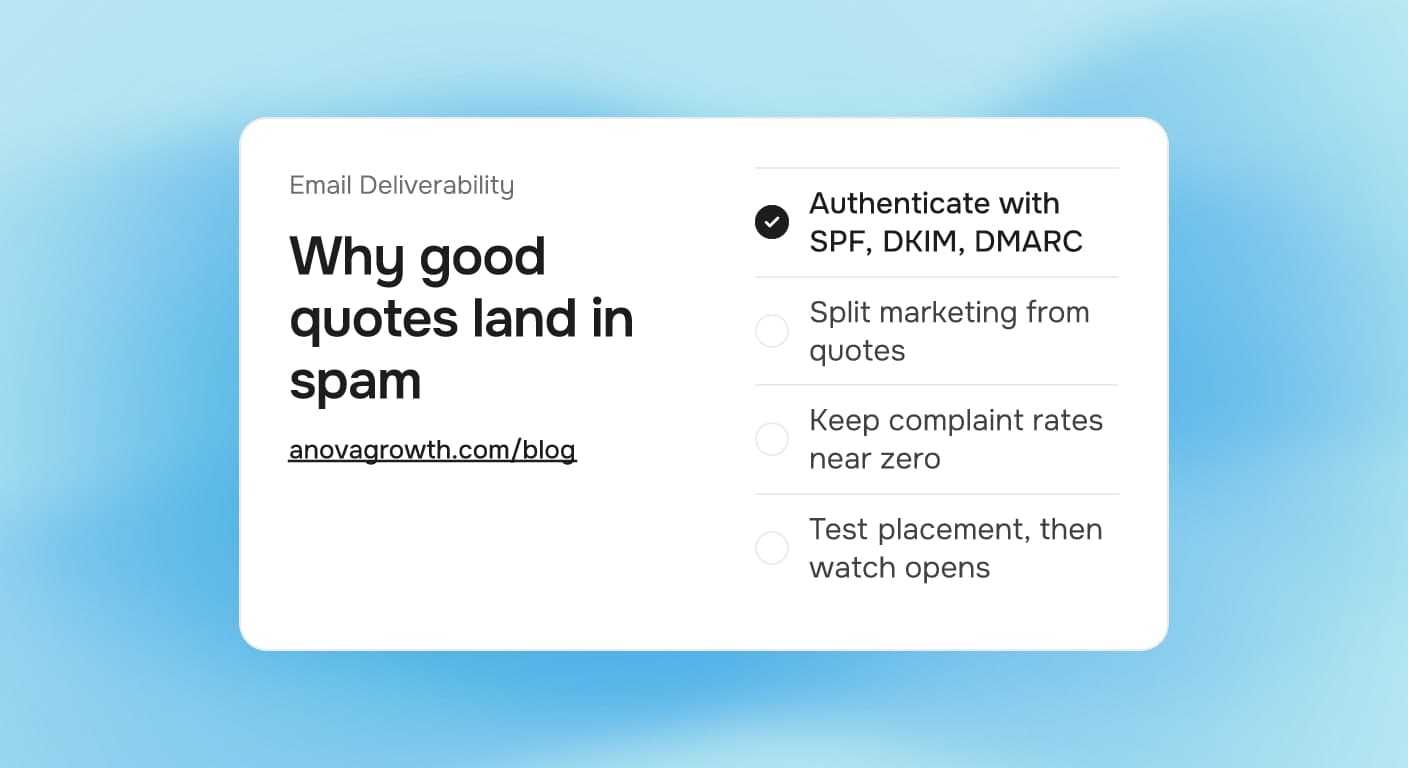
A homeowner waits on your quote. It never looks like it arrived, so they call the next company on the list. What they will not tell you: the quote went to their junk folder, and they never check it. You did the work, priced it right, sent it on time. The mailbox provider decided you were spam anyway.
That is an email deliverability problem, and it is one of the quiet money leaks for service businesses. Every quote, invoice, review request, and follow-up you send by email depends on mailbox providers trusting your domain. This guide explains why their filters say no, which records to fix, and how to prove the fix worked before you blame your sales process.
The Quick Answer
Email deliverability is whether your messages land in the inbox instead of the spam folder. For service businesses, quotes and review requests get filtered when your domain lacks SPF, DKIM, and DMARC records, when marketing blasts share the same sending reputation, or when complaint rates climb. Fix the DNS records first, then split bulk sending, then measure actual placement.
Why Good Quotes Land in Spam
Gmail, Outlook, and their peers filter billions of messages a day. They do not read your email and judge your writing. They ask three questions about the sender instead:
- Is this server allowed to send for this domain? That is SPF, a DNS record listing your approved sending servers.
- Was this message signed and untouched in transit? That is DKIM, a cryptographic signature attached to each email.
- What should we do when the first two fail? That is DMARC, a policy record where you tell providers how strictly to treat failures, plus a channel that reports back to you.
Small businesses fail all three for boring reasons. The records were set up once by a former IT contractor and never updated. You switched CRMs and the new tool sends from servers your old SPF record never named. Your web form sends through a different platform than your invoicing system. Each change silently breaks permission for one more sender, and spam placement creeps in one mailbox provider at a time.
What this looks like in practice: a remodeling company adds a new estimating tool that emails quotes directly from their domain. The tool's sending servers were never added to SPF, and its messages carry no DKIM signature. Gmail starts flagging every quote as unverified. The owners spend months blaming follow-up sales calls, price objections, and the market, while the actual failure is one missing DNS include.
What You See and What to Fix First
Different symptoms point at different causes. Work this table top down, because authentication problems corrupt everything below them.
| What you see | Likely cause | First fix |
|---|---|---|
| Clients say your quote or invoice never arrived | Missing or broken SPF, DKIM, or DMARC | Publish and verify all three records |
| Filters got worse after switching CRMs or schedulers | New tool's servers missing from SPF | Add the new include, then re-check the record |
| One provider flags you, others do not | Reputation damage on that provider | Read message headers, fix what they report |
| Newsletters fail, personal replies work | Bulk volume drags shared reputation | Move marketing to its own subdomain |
| Brand new domain, everything filtered | Cold sending reputation | Warm up volume gradually over weeks |
Fix Authentication First
SPF, DKIM, and DMARC sound like security theater, but each one answers a specific question a mailbox provider asks before showing your message. Set them up in this order:
- List every tool that sends email as you. Your CRM, scheduling software, invoicing app, website forms, and any helpdesk. Each one can send email with your name on it.
- Publish SPF with each tool's include. Most vendors document the exact record to add. Keep the record under control: SPF allows a maximum of ten DNS lookups, and a record that chains too many includes fails silently for everyone.
- Turn on DKIM for each sender. Every serious CRM has a settings step that hands you a DKIM key to publish. Do it per tool, not only for your main domain as a whole.
- Publish DMARC in monitoring mode first. Start with a policy that watches and reports rather than blocks, read the reports for a few weeks, then tighten once you know every legitimate sender passes.
DMARC has one more trap worth naming: alignment. If a tool stamps its own domain as the visible sender, your domain gets none of the credit even when SPF and DKIM pass. When your CRM offers custom sending domains, configure it so the message is genuinely sent as you, not merely on your behalf.
Keep Quotes and Blasts Apart
Even with perfect records, volume shapes reputation. A newsletter to 4,000 contacts and a one-off quote to a homeowner are judged differently by filters. Send them from separate places:
- Transactional email (quotes, invoices, appointment confirmations, review requests) comes from your main domain at low, steady volume. Protect this lane hardest.
- Marketing email (newsletters, promotions, seasonal blasts) goes out through a subdomain or a dedicated sending domain. If a campaign annoys enough people to raise complaints, the damage lands on the bulk lane while quotes keep arriving clean.
List hygiene is part of the same habit. Remove hard bounces promptly, prune contacts that have not opened anything in a year, and use a proper one-click unsubscribe on bulk mail. The big mailbox providers now require authentication and easy unsubscribe from bulk senders, and Google publishes a spam-rate threshold around 0.3 percent. Cross it and even your transactional email starts paying for the blast's mistakes.
Watch the Numbers That Matter
Deliverability is measurable, and the important numbers do not include the ones most owners get excited about. Track these instead:
- Placement by provider. Gmail, Outlook, and corporate servers run different filters. A fix that helps Gmail can leave Outlook broken.
- Complaint rate. The share of recipients reporting spam, per campaign and overall.
- Bounce rate. Hard bounces pile up fast when a customer list ages, and they read as sloppiness to filters.
- Opens, after changes. Opens are imperfect, but a sudden drop after a DNS or CRM change is a loud signal.
To see placement directly, send yourself test messages to accounts on Gmail, Outlook, and your own domain, then open Gmail's "Show original" view and confirm the SPF, DKIM, and DMARC lines each say PASS. Run that check after every DNS edit and every tool swap, starting with setup. Free checkers exist for quick scans, but a real message in a real mailbox tells the truth.
What We Do in Our Own Shop
AnovaGrowth runs on automated follow-up, which means our reputation as a sender is the same thing as our revenue pipeline. The practices above are not theory for us:
- SPF, DKIM, and DMARC are published and current for every tool we send through, and we re-verify whenever a platform changes.
- Marketing sends and client-facing quotes run on separate sending identities, so a bad campaign never sits between a quote and a buyer.
- We send a real test message and read the raw headers after every DNS change, because a record that validates in one checker can still fail in the wild.
- Lists get pruned on a schedule, not when something breaks.
The whole setup took an afternoon of DNS work and a checklist. It is the reason an automated review request or invoice reminder reaches the customer instead of dying in a junk folder. If you run email automation without this foundation, every workflow you build inherits the same weakness. Our AI automation services start with sending infrastructure for exactly that reason.
Common Fan-Out Questions
Should marketing email move to a subdomain?
Usually yes, once you send regular bulk campaigns. A subdomain like news.yourdomain.com builds its own reputation, so complaint spikes land there instead of on the identity your quotes depend on. Keep transactional email on the root domain and warm up any new subdomain gradually.
What do the bulk sender rules mean for a small shop?
The 2024 Google and Yahoo requirements, and Microsoft's matching rules for high-volume senders in 2025, apply directly to bulk senders. A shop sending a few hundred messages rarely hits volume tiers, but the same standards are good sense at any size: authenticate your domain, honor unsubscribes, keep complaints low. Following them at small scale means nothing breaks when scale arrives.
Does SPF need my CRM's servers?
If the CRM sends email appearing to come from you, yes. Check the vendor's deliverability docs for the include to add, then confirm you have not pushed the record past ten DNS lookups. When two vendors both need includes and space runs out, that is the cue to consolidate sending tools or move bulk mail to a subdomain.
How long does a new sending domain take to build trust?
Weeks, not days. Start with low volume to your most engaged recipients, raise it gradually, and keep complaint rates near zero throughout. Buying a fresh domain to escape a bad reputation resets nothing: filters look at behavior, and a new domain that instantly blasts thousands of messages looks like exactly what spammers do.
Do links and attachments affect delivery?
They can. Some filters treat shortened links as suspicious because they hide the destination, and unexpected attachments raise file-type flags. For quotes, a link to a page or PDF hosted on your own domain reads cleaner than a shortener, and plain, specific link text beats generic click-here strings.
When does an owner hand this off?
When it touches three tools at once. If records live in your DNS, your CRM, your invoicing app, and your marketing platform, delivering a coherent fix means coordinating all four, and that is a half-day project with permanent payoff rather than hourly firefighting. It is the kind of setup work we handle as part of building any email-driven workflow, including the automated email marketing and review request automation we set up for service companies.
Key Takeaways
- Spam placement is usually an identity problem, not a writing problem. Fix SPF, DKIM, and DMARC before anything else.
- Keep transactional email (quotes, invoices, confirmations) and bulk marketing on separate sending identities.
- Prune lists, honor unsubscribes, and keep complaint rates near zero, because bulk mistakes tax your transactional lane.
- Test real placement with real messages after every DNS and tool change. Pass lines in Gmail's "Show original" view are the receipt.
- If a CRM switched, quotes are missing, or open rates dropped, check deliverability before rewriting your sales process.
Next Steps
Pull up your domain's DNS records today and check three things: does SPF exist and name every tool you send through, is DKIM enabled where your CRM offers it, and is there a DMARC record at all. Ten minutes of looking tells you whether the quote that never arrived had help getting lost.
If compliance or mailbox-provider politics sound like someone else's job, that is the point where it becomes ours. Contact us to talk through your sending setup, and read why your email lists need the same hygiene to keep the addresses behind these records clean.
Related articles

Automated Email Marketing for Service Businesses: Turn One-Time Customers Into Repeat Revenue
Most service businesses treat email marketing like an afterthought. Automated email campaigns recover 20-40% of dormant customers and fill next-week slots without adding sales headcount.
Read the article: Automated Email Marketing for Service Businesses: Turn One-Time Customers Into Repeat Revenue
AI for Service Business Slow Season: Use the Lull to Build the Playbook That Wins the Rush
Use the slow season to build seven AI-driven systems that improve revenue, margin, and close rates before the next service rush.
Read the article: AI for Service Business Slow Season: Use the Lull to Build the Playbook That Wins the Rush
AI Reputation Monitoring and Review Response for Service Businesses: Catch Every Mention, Reply Before It Hurts
AI reputation monitoring catches every Google, Yelp, and Facebook mention in one place and drafts on-brand review responses before slow replies cost you stars.
Read the article: AI Reputation Monitoring and Review Response for Service Businesses: Catch Every Mention, Reply Before It Hurts
