Field Service Automation for Service Businesses: Equip Your Techs With Mobile Tools That Actually Work
Service businesses lose 2-4 hours per tech per day to manual work. Field service automation gives techs a mobile app for scheduling, parts, and invoicing.

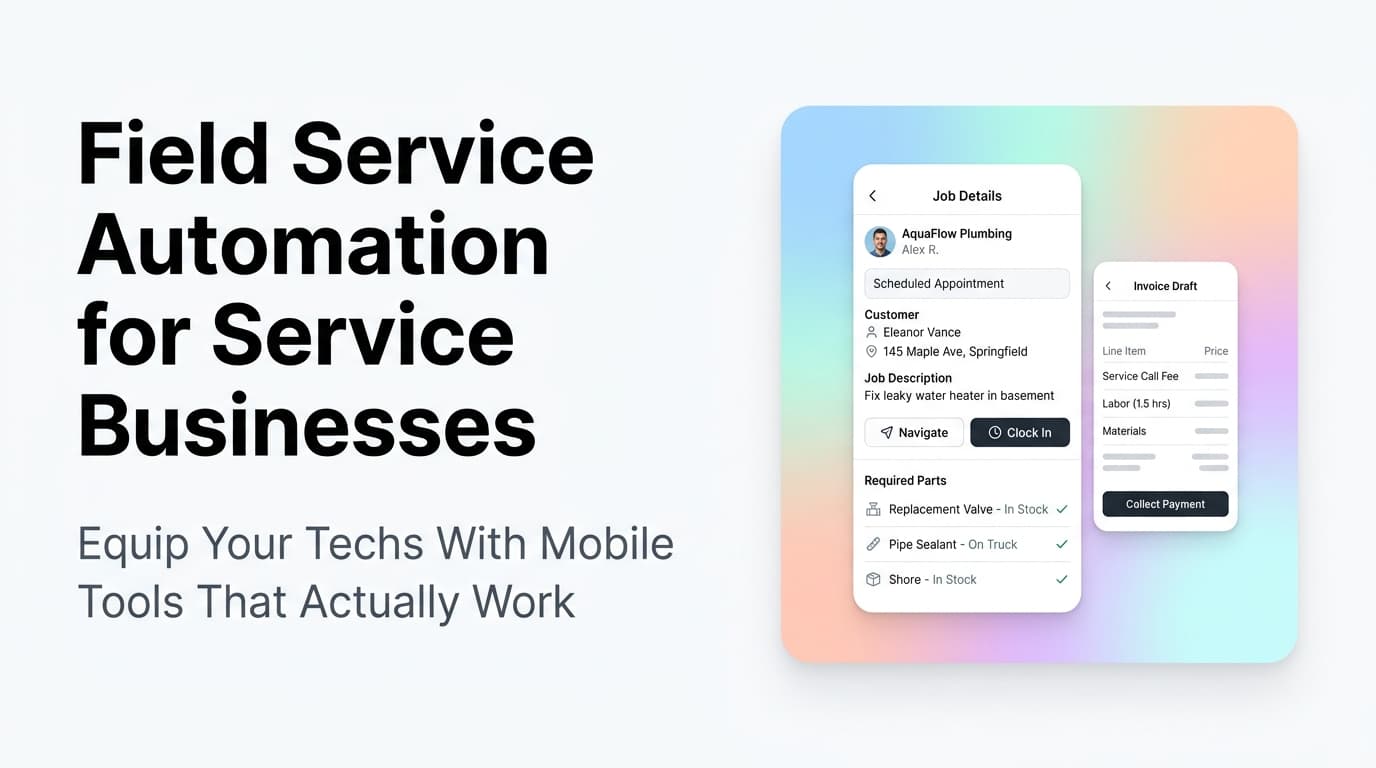
Quick answer: Field service automation replaces paper tickets, whiteboard schedules, and disconnected tools with a mobile app that gives each technician job details, route optimization, parts inventory, customer history, and digital invoicing. Service businesses that implement it see 20-30% more jobs completed per day and cut billing cycles from weeks to same-day.
The Paper Problem That's Costing You Billable Hours
Walk into most service businesses and you will see the same scene: a whiteboard with sticky notes for tomorrow's schedule, clipboards of paper tickets coming back from the field, and someone at a desk typing invoices from handwritten notes at the end of the day.
This is not a workflow problem. It is a revenue leak.
Every hour a technician spends driving back to the shop for a part, filling out paperwork, or waiting for the dispatcher to call them with the next job is an hour they are not billing. For a team of five techs billing at $100/hour, losing two hours per day to manual processes costs over $250,000 a year in lost billable time.
Field service automation solves this by putting everything a technician needs into a single mobile app: their schedule, job details, customer history, parts availability, navigation, and digital invoicing.
What Field Service Automation Actually Looks Like
| Before Automation | After Automation |
|---|---|
| Dispatcher calls or texts each tech with job details | Jobs auto-assign to the nearest available tech |
| Tech writes paper ticket, returns to office to file it | Tech completes digital ticket on site, syncs instantly |
| Parts lookup means calling the shop or driving back | Mobile inventory shows real-time stock at truck and warehouse |
| Invoicing happens 1-3 days after job completion | Invoice generated and sent from the job site |
| Customer history requires a call to the office | Full history available on the tech's phone |
| Route planning is "whoever knows the area best" | GPS-optimized routing for every stop |
The Four Components of a Field Service Automation Stack
1. Mobile Dispatch and Scheduling
The dispatch system should automatically assign jobs based on technician skills, location, and availability. When a job comes in, the system checks who is closest, has the right certifications, and is available. The tech gets a push notification with the job details, customer contact info, and a map link.
What to look for: Real-time GPS tracking so the office knows where every tech is without calling them. Drag-and-drop schedule adjustments for last-minute changes.
2. Digital Job Tickets and Forms
Paper tickets get lost, smudged, and misinterpreted. Digital job tickets capture everything: time on site, work performed, parts used, photos of the completed work, and customer signature. The data flows directly into your CRM and accounting system.
What to look for: Customizable form templates that match your specific service types. Offline mode so techs can work in basements or rural areas without cell service and sync when they reconnect.
3. Mobile Inventory and Parts Management
Nothing kills a job faster than showing up without the right part. Mobile inventory management lets techs check what is on their truck, what is in the warehouse, and what needs to be ordered. Some systems even auto-reorder fast-moving parts.
What to look for: Truck-level inventory tracking, not just warehouse. Low-stock alerts. Barcode or QR code scanning for quick check-in and check-out.
4. Digital Invoicing and Payment Collection
The fastest way to get paid is to invoice on the spot. Digital invoicing lets techs generate and send an invoice from the job site, collect payment by card or digital wallet, and close the job in one flow. No more "we will mail you a bill."
What to look for: Integrated payment processing. Automatic syncing with your accounting software. Support for partial payments, deposits, and payment plans.
How Service Businesses Actually Implement This
At AnovaGrowth, we have helped service businesses across HVAC, plumbing, electrical, and field maintenance move from paper-based operations to automated field service systems. Here is what the implementation process looks like in practice:
Week 1-2: Audit current field operations. Map out every step from job creation to payment collection. Identify where paper, phone calls, and manual data entry create delays. Most businesses find 8-12 distinct handoffs that can be automated.
Week 3-4: Select and configure the platform. Some businesses use an all-in-one field service management platform like Housecall Pro, Jobber, or ServiceTitan. Others need a custom integration layer that connects their existing CRM, accounting, and scheduling tools. The right choice depends on how much customization your specific workflows require.
Week 5-6: Pilot with 2-3 techs. Run the system with a small group first. Work out the kinks in form templates, routing logic, and payment flows before rolling out to the whole team.
Week 7-8: Full rollout and training. Train all techs on the mobile app. Set up the office team on the dispatch dashboard. Go live and cut paper tickets.
Real example: A Rome, GA HVAC company with 6 techs was losing an average of 3 hours per tech per day to manual processes. After implementing field service automation, they reduced that to under 30 minutes. Their billing cycle dropped from 5 days to same-day. Within 3 months, they were completing 25% more jobs without adding a single technician.
Common Mistakes When Adopting Field Service Automation
Skipping the offline mode check. If your techs work in areas with spotty cell coverage, the mobile app must work offline. Test this before committing to a platform.
Not integrating with your existing CRM. A field service app that does not sync with your CRM creates a new data silo. Make sure job history, customer contact info, and service agreements flow both ways.
Overcomplicating the forms. Start with the minimum fields needed to complete a job. You can always add more later. Techs will reject a system that requires 40 form fields for a simple service call.
Forgetting about payment collection. The whole point of digital invoicing is getting paid faster. Make sure the payment flow is simple enough that techs can walk customers through it in under 60 seconds.
Related Questions Business Owners Ask
- How do I choose between an all-in-one field service platform and a custom-built solution?
- What field service software integrates best with QuickBooks and Xero?
- How do I train older technicians who are not comfortable with mobile apps?
- Can field service automation work for a single-truck operation, or is it only for larger teams?
- What happens to my data if I switch field service platforms later?
- How do I handle emergency jobs and same-day scheduling in an automated system?
AnovaGrowth's Take
We have seen too many service businesses buy expensive field service software and then abandon it because the implementation was rushed or the tool did not match their actual workflow. The key is not finding the most feature-rich platform. It is finding the one that matches how your specific business operates and then committing to the transition.
Start with a clear map of your current process. Automate the handoffs that create the most friction. Get the mobile app into your techs' hands and iterate from there. The businesses that do this well do not just save time. They build a competitive advantage that is hard for slower competitors to match.
Ready to automate your field operations? Contact us to discuss how we can help your service business move from paper tickets to mobile automation.
Learn more: Automated Dispatch and Route Optimization | Quote-to-Cash Automation | CRM Integration for Service Businesses | Automated Inventory Management
Related articles

Automated Change Order Management for Service Businesses: Get Extra Work Approved Before It Disappears
Service businesses lose approved revenue when field changes stay in texts and notebooks. Automate change orders from discovery to approval and payment.
Read the article: Automated Change Order Management for Service Businesses: Get Extra Work Approved Before It Disappears
Automated Contract and E-Signature Workflows for Service Businesses: Send, Sign, and Store Every Agreement Without the Chase
Manual contract chasing costs service businesses 10-30% of signed deals. Automated e-signature workflows close jobs faster and keep every agreement on file.
Read the article: Automated Contract and E-Signature Workflows for Service Businesses: Send, Sign, and Store Every Agreement Without the Chase
Technician Utilization Tracking for Service Businesses: Find the Hours You Never Bill
Technician utilization tracking shows how many hours your crews bill versus idle, travel, admin, and windshield time. Here is how to set it up and use it.
Read the article: Technician Utilization Tracking for Service Businesses: Find the Hours You Never Bill
